Hey everyone, Sarah here, and I’ve been running around with our team of vision inspection system suppliers for the last 12 years, fixing, tweaking, and training folks on the systems we build and install. Let’s be real—when we sell a vision inspection system to a manufacturing line, no one’s thinking about what comes after the big install. They’re just hyped that the line’s finally up, it’s catching those 0.2mm defects they missed with the old human eye setup, and downtime is way down. But here’s the tea: a system that runs great out of the box? It’ll start slacking hard in 6 months if you don’t maintain it right. I’ve seen so many clients call us panicking, like “our system’s flagging 10% good parts as defective” or “it’s dead mid-shift” because they skipped basic maintenance. Today I’m breaking down exactly what to do, no fancy jargon, just stuff we actually see work on the lines we service every week. Vision Inspection Systems
First off, let’s get one thing straight: maintaining a vision system isn’t rocket science. It’s way simpler than keeping a car running, but you can’t just fill it with gas and forget it. Let’s start with the most basic part that 90% of people ignore—camera and lens care. I can’t tell you how many times we show up to a site where a lens is caked in a layer of fine metal shavings, dust from a plastic molding line, or even coffee residue (yes, really—one snack line had a barista spill a latte right over the inspection window). The camera can’t pick up defects if its view’s blocked, right? So what’s the routine here? We tell every client we work with to do a daily 2-minute pre-shift check on the cameras and lenses. That means wiping the lens with a lint-free microfiber cloth and a little lens cleaner (never Windex—it leaves streaks, and those streaks make the system misread) and checking that the camera’s housing isn’t loose or smudged on the outside. Wait, also—check the light mounts too! If your system uses LED lighting (which almost all modern ones do), make sure none of the LED strips are burned out. A single dead LED can throw off the whole contrast, and suddenly a part that’s supposed to be bright is dim, so the system marks it as defective. I had a client last month where a $5 LED strip dying cost them 2 hours of unplanned downtime because they didn’t check the lights for a week.
Next, the software side. This is where a lot of people mess up, because vision system software isn’t “set it and forget it.” Parts change, right? A plastic bottle cap might have a new logo, or a metal stamping part might have a tiny new feature added to cut material costs. If you don’t update the system’s “knowledge base” of what a good part looks like, it’ll start rejecting good parts. We recommend doing a weekly software calibration check. What does that look like? Grab 20 parts that you know are perfect, run them through the inspection cycle, and check the results. If more than one gets marked as defective, that’s a sign you need to tweak the software’s threshold settings. Also, software updates—don’t skip those. We push updates every 3 months that fix little glitches, add new defect detection algorithms, or patch security stuff (we get so many small line operators who forget about cybersecurity!). Last year, a client of ours skipped 3 updates and ended up with a bug that made the system crash every time a certain part type ran—cost them $4k in lost production.
Then there’s the hardware stuff that’s easy to overlook. The control box, the cables, the conveyor belts that feed parts into the system. Wait, the conveyor? How does that matter? Because if parts are misaligned when they reach the camera, the system can’t get a clear shot of them. So every month, do a check of the conveyor’s guides—make sure they’re adjusted so parts slide straight through the inspection window, not tilted at an angle. Also, check all the cables that run from the cameras to the control box. We’ve seen mice chew through Ethernet cables in a food plant (gross, I know) and loose power cables that cause random shutdowns. Tighten cable connections, label them so if a cable does go bad, you can swap it fast, and keep the control box clean—don’t stack boxes on top of it, make sure it’s in a cool, dry spot. Overheating control boxes are the #1 cause of random system crashes, no joke. We replace at least 10 control box fans a month because clients don’t clean the dust off the vents.
Now, let’s talk about something that’s not exactly maintenance, but it’s tied directly to how well your system stays maintained: training your operators. I can’t tell you how many times I show up to a site and the operator is like “wait, I didn’t know I was supposed to do that.” Most vision inspection systems aren’t hard to run, but maintenance tasks are separate from just hitting “start” on the line. We make sure every client gets a 2-hour hands-on training when we install the system, but a lot of folks let that slip after a few months. We recommend doing a quarterly refresh training—either a 30-minute virtual call with our team or an in-person walkthrough where we go over the daily/weekly checks, how to reset a glitch, and what to do if the system flags too many good parts. I had a small automotive parts client last year where their operator thought the system was broken for 2 weeks, but it just needed the lens wiped and a quick software tweak. He didn’t know how to do either, so they were manually inspecting 500 parts an hour, which was a disaster.
Also, a big one: keep a spare parts kit on hand. I know, small businesses hate spending money on spares, but it’s way cheaper than dealing with unplanned downtime. What should be in your kit? A few extra lens cloths and cleaner, spare LED strips (for your lighting system), a couple of Ethernet cables, and a spare fuse for the control box. We sell affordable pre-made spares kits for all the systems we supply, and every client that’s used one has cut their downtime by at least 30%. Last quarter, we had a client whose LED strip burned out on a Friday evening, and they had a spare LED in their kit—they swapped it in 10 minutes instead of waiting 2 days for a replacement, which would have cost them thousands in lost weekend production.
Wait, let’s not forget about long-term maintenance. After a year of running, the parts being inspected might start to wear, or the system’s calibration will drift a little. We recommend doing a full system calibration every 12 months. That’s when one of our techs comes out, checks the camera focus, adjusts the lighting to make sure the contrast is still right, re-calibrates the software with 50 perfect parts (more than the weekly check, so it’s more accurate), and does a full hardware check on all the connections and fans. We offer annual maintenance contracts for all our systems, and I can’t say enough good about them. The clients who have these contracts almost never have emergency breakdowns, because we catch small issues before they become big ones. For example, a client in the medical device industry had a minor loose cable that would have caused a crash in a month—we caught it during a routine calibration and fixed it for free, no downtime.
Let’s get real for a second—some of this stuff seems like extra work, but let’s do the math. If your vision inspection system is running at 100% efficiency, it’s catching all the defects, reducing waste, and keeping your line running. If you skip maintenance, you’re looking at downtime, rejected good parts, lost production, and higher repair bills. We’ve had clients tell us that the money they spend on maintenance is 10x less than what they save by avoiding unplanned issues. I get it, as a line manager or owner, you’re busy, you’ve got a hundred things on your plate, but 10 minutes a day and an hour a week of maintenance will save you so much stress and money in the long run.
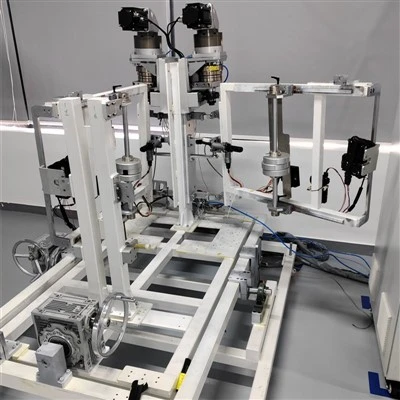
If you’re running a manufacturing line and have a vision inspection system, or you’re thinking about getting one, and you’re not sure where to start with maintenance, hit us up. We don’t do pushy sales calls—we just help folks figure out what their system needs, whether it’s a quick training session, a spare parts kit, or an annual maintenance contract. We’ve worked with everything from small snack plants to big automotive factories, so we know exactly what works for different lines. Don’t wait until your system breaks mid-shift—start a maintenance routine today, and your vision inspection system will run like a champ for years.
Automated Workstations Now, let’s wrap this up quick—maintaining a vision inspection system isn’t complicated. Stick to daily camera/lens checks, weekly software calibration, monthly hardware and cable checks, quarterly operator training, keep a spare parts kit, and get annual professional calibration if you can. That’s it. No fancy stuff, just consistent, small steps that pay off big.
References
- Machine Vision Association of the Automated Imaging Association. (2022). Preventive Maintenance Best Practices for Industrial Vision Systems. AIA International.
- Global Manufacturing & Production magazine. (2023). "Reducing Unplanned Downtime: The ROI of Vision System Maintenance for Small-to-Mid Sized Manufacturers". Global M&P Insights.
- Vision Inspection Suppliers Collective. (2021). Operator Training Guidelines for Long-Term System Performance. VISC Operations Manual.
Ningbo Autino Automation Equipment Co., Ltd.
As one of the most professional vision inspection systems manufacturers and suppliers in China, we also support customized service. We warmly welcome you to buy advanced vision inspection systems from our factory. If you have any enquiry about quotation, please feel free to email us.
Address: No.555 Beichuan Road, Jiangbei District, Ningbo City, Zhejiang Province, P.R. China
E-mail: sales@autino.cn
WebSite: https://www.autinotech.com/
